On-device Nothing uploaded Works offline

One-time purchase · No subscription

Hear any document. Type with your voice. Tailor every résumé. Catch up without reading.

Four desktop apps, powered by AI, that do all their work on your own computer. The novel you're drafting, the notes you dictate, the wall of output your coding agent just produced, the job history you'd rather not upload — none of it ever leaves your machine.

Everything happens on your computer. Nothing you write, say, or apply for ever leaves it.

  • ReadDocuments read aloud, in real voices
  • SpeakYou talk — it types, in any app
  • ApplyRésumés tailored to each job
  • ViewHear the gist of a long agent run

Windows today, macOS planned · No account, ever · Trials and checkout open soon

Local model · Nothing uploaded · Ready offline

The tour: all four apps in 75 seconds, recorded from the real apps. Press play — it has sound.

The Nocturne Suite

One local AI. Four ways to use it.

Read

with Nocturne

Every document, read aloud beautifully — novels with distinct character voices, contractions and coined names read as speech, narration you can listen to for hours.
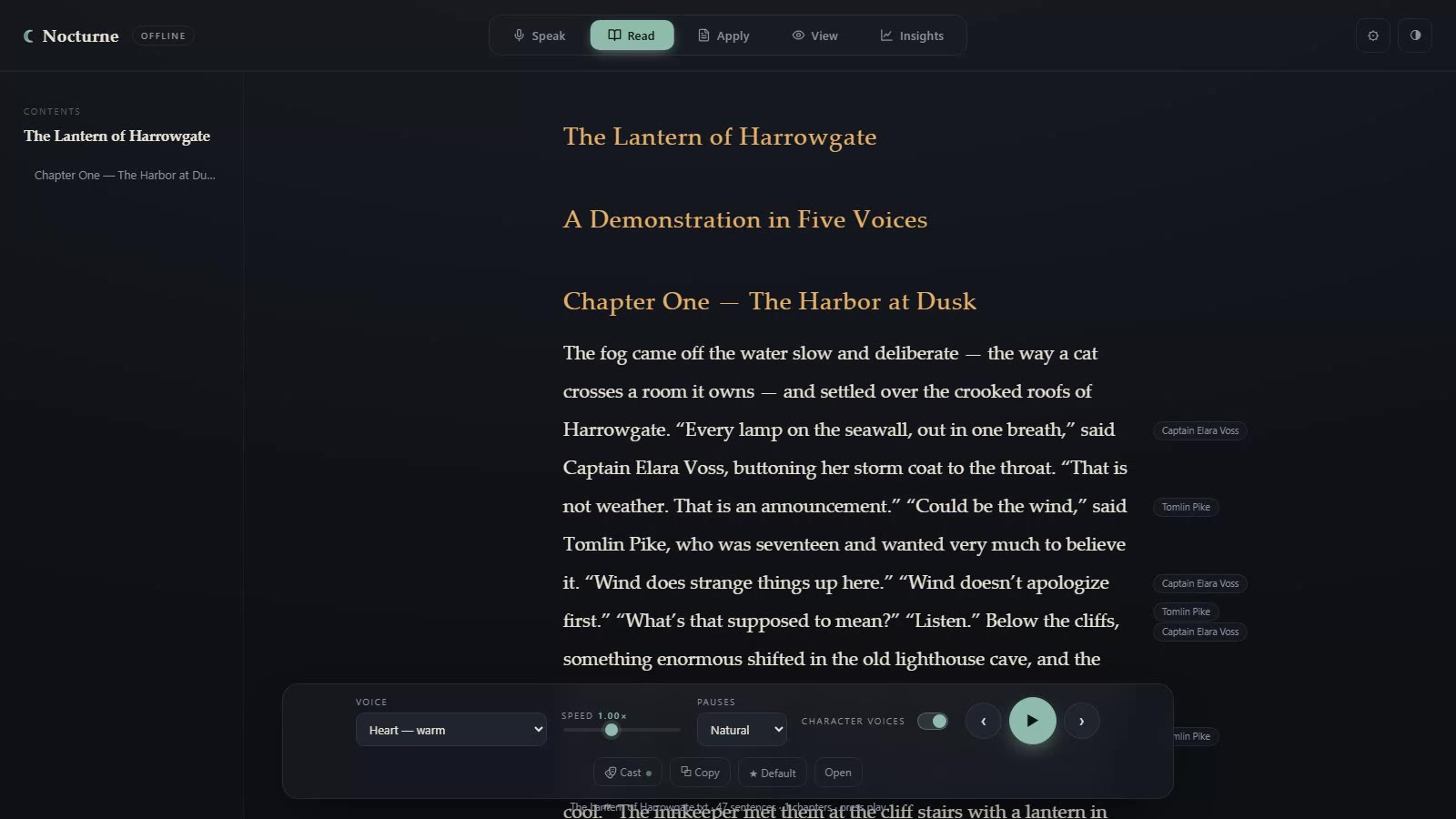
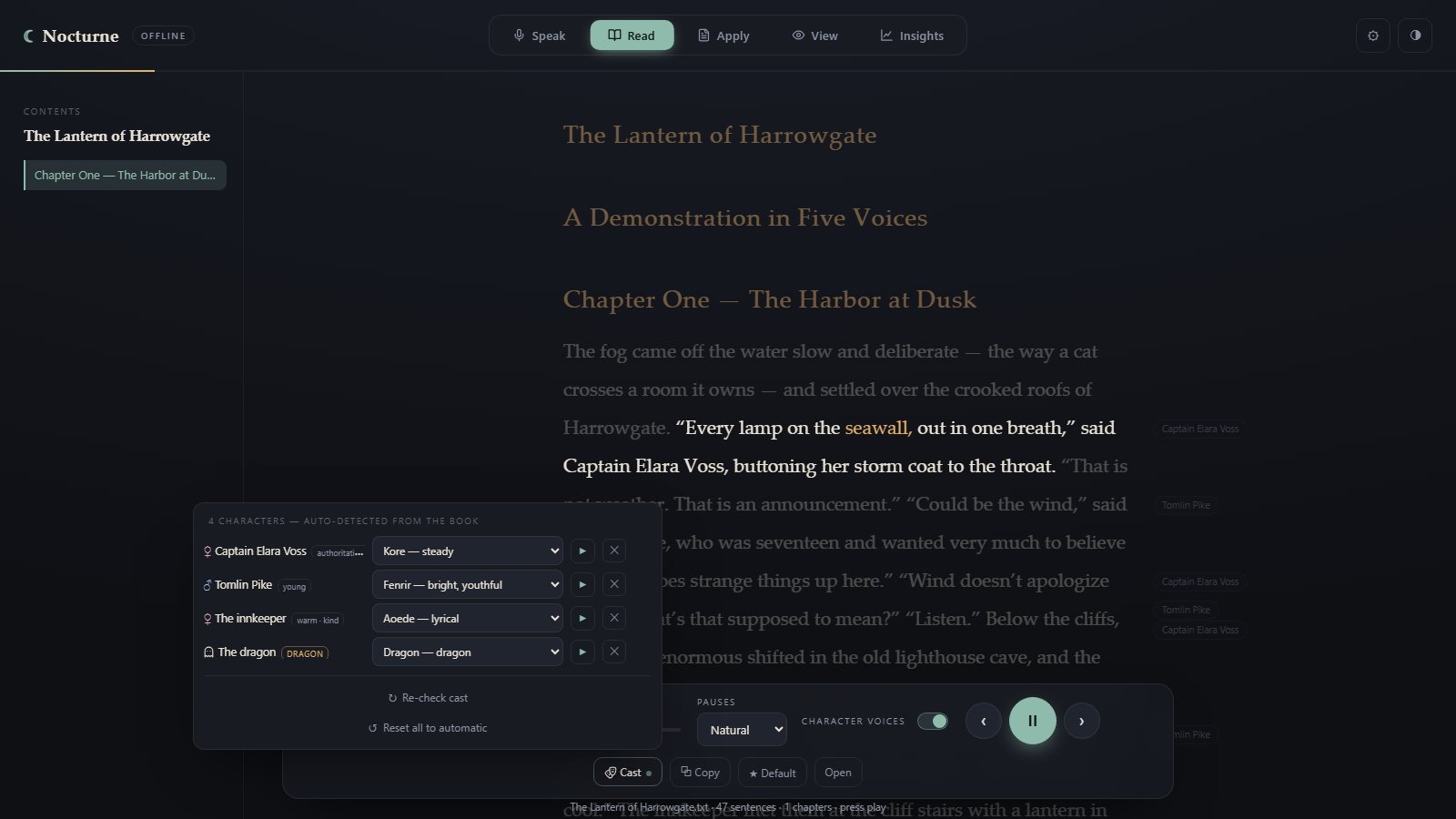
Nocturne Read with a demo story open: chips beside the text name the character speaking each line, and the player bar sets the narrator voice, speed and pauses.
  • Knows what it's reading — a poem, a PDF, a novel — before it speaks
  • Distinct voices for each character, matched to who they are in the story
  • Expressive delivery — questions rise, and slang like "gonna" and "ain't" reads as speech, not spelling
  • Nine non-human voices for non-human characters — any can narrate a whole book

$59 · one-time · coming soon

Explore Nocturne Read →
Speak

with Nocturne

You talk. It types. Everywhere. System-wide dictation that follows natural speech into any app on your machine.

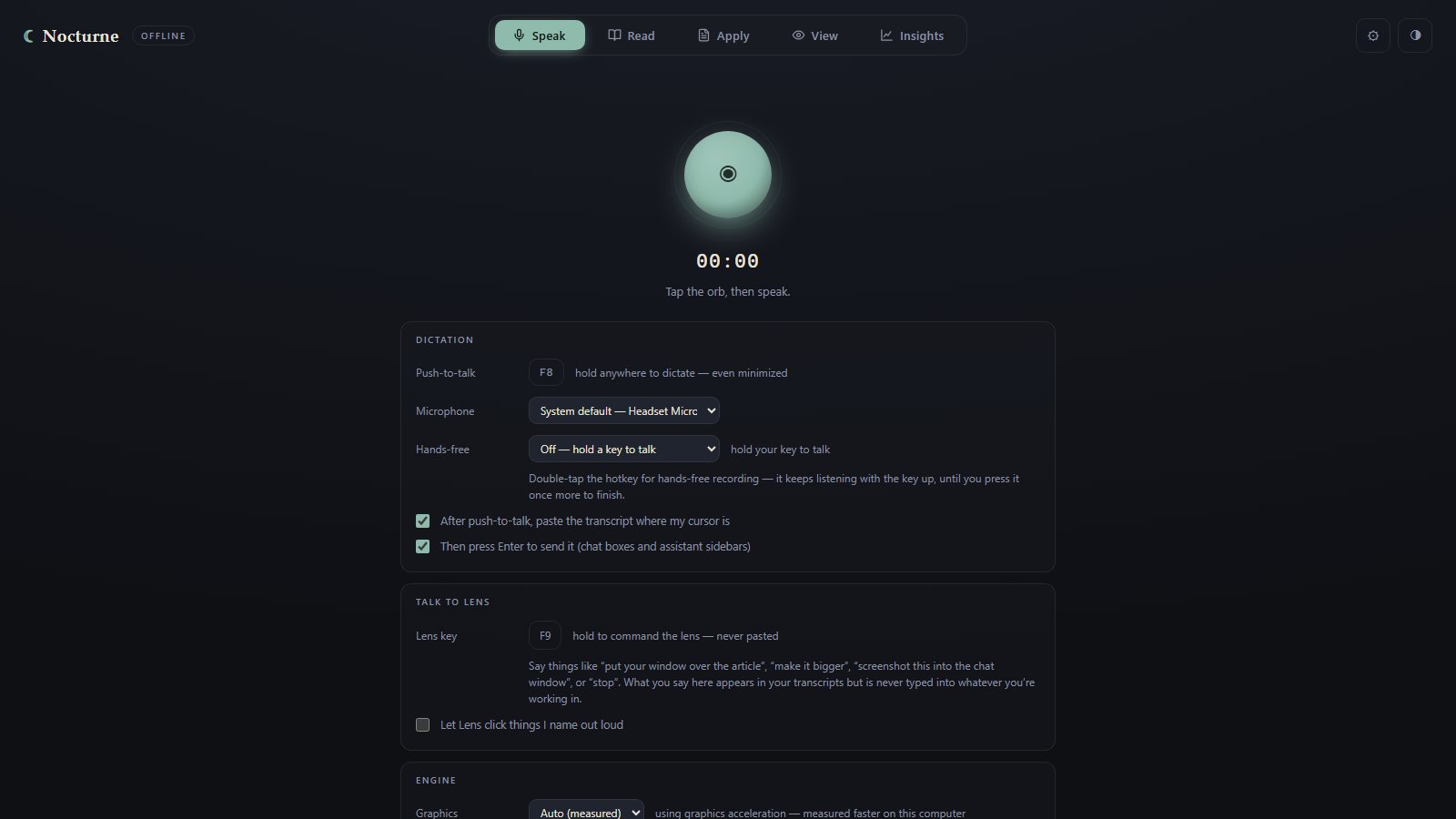
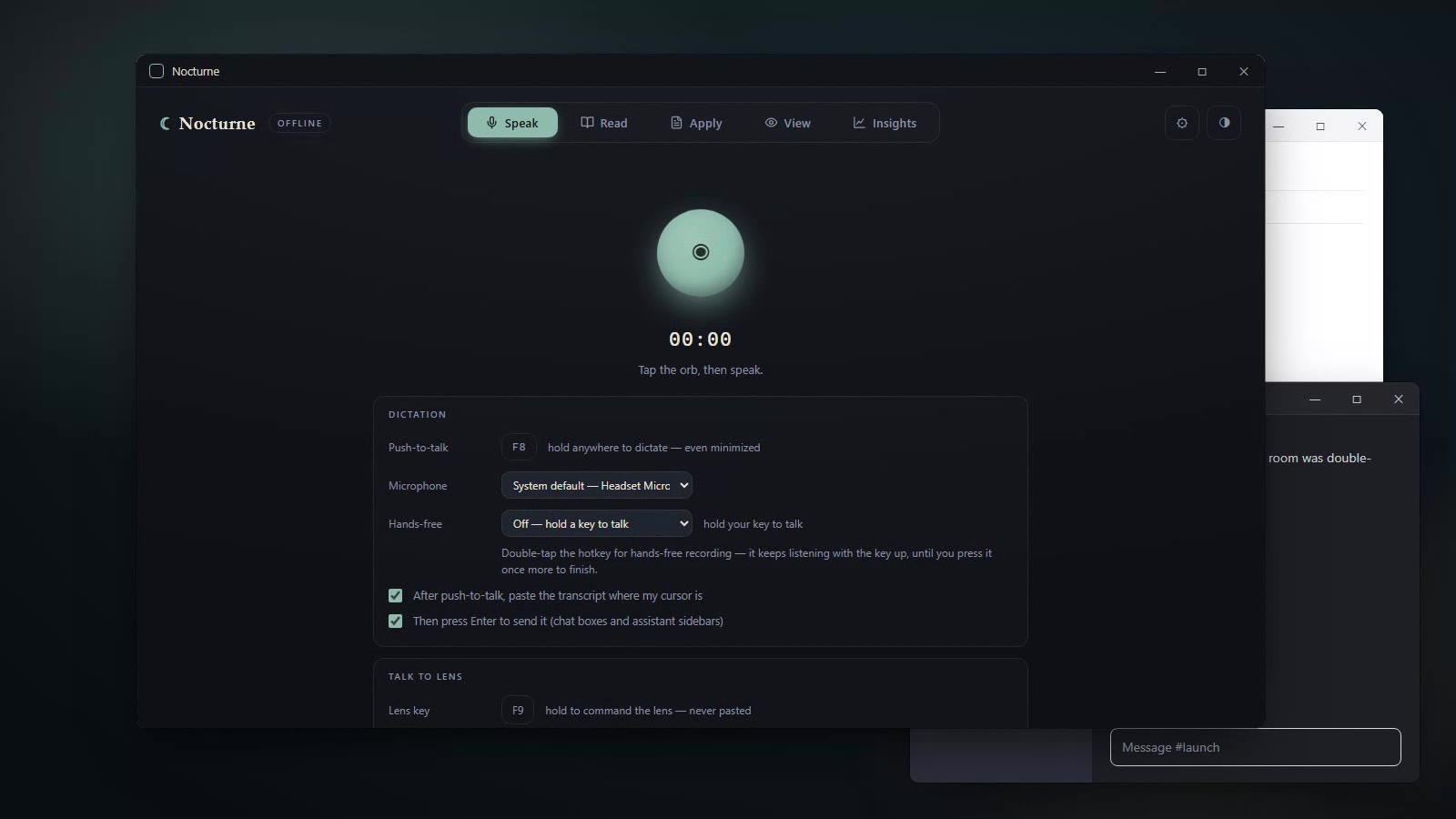
The Nocturne Speak tab in front of a chat window: the listening orb, the F8 push-to-talk key, microphone and hands-free settings, and the paste-at-cursor options.
  • Works in every app — email, editor, browser, notes
  • Pick how much it tidies — just the basics, polish it, or rewrite it clearly
  • Push-to-talk, a double-tap to keep listening, or a wake word — even with the window tucked away
  • Your voice is transcribed on your machine and never uploaded

$59 · one-time · coming soon

Explore Nocturne Speak →

Apply

with Nocturne

Your résumé and a job listing go in; a tailored résumé and a cover letter that sounds like you come out.

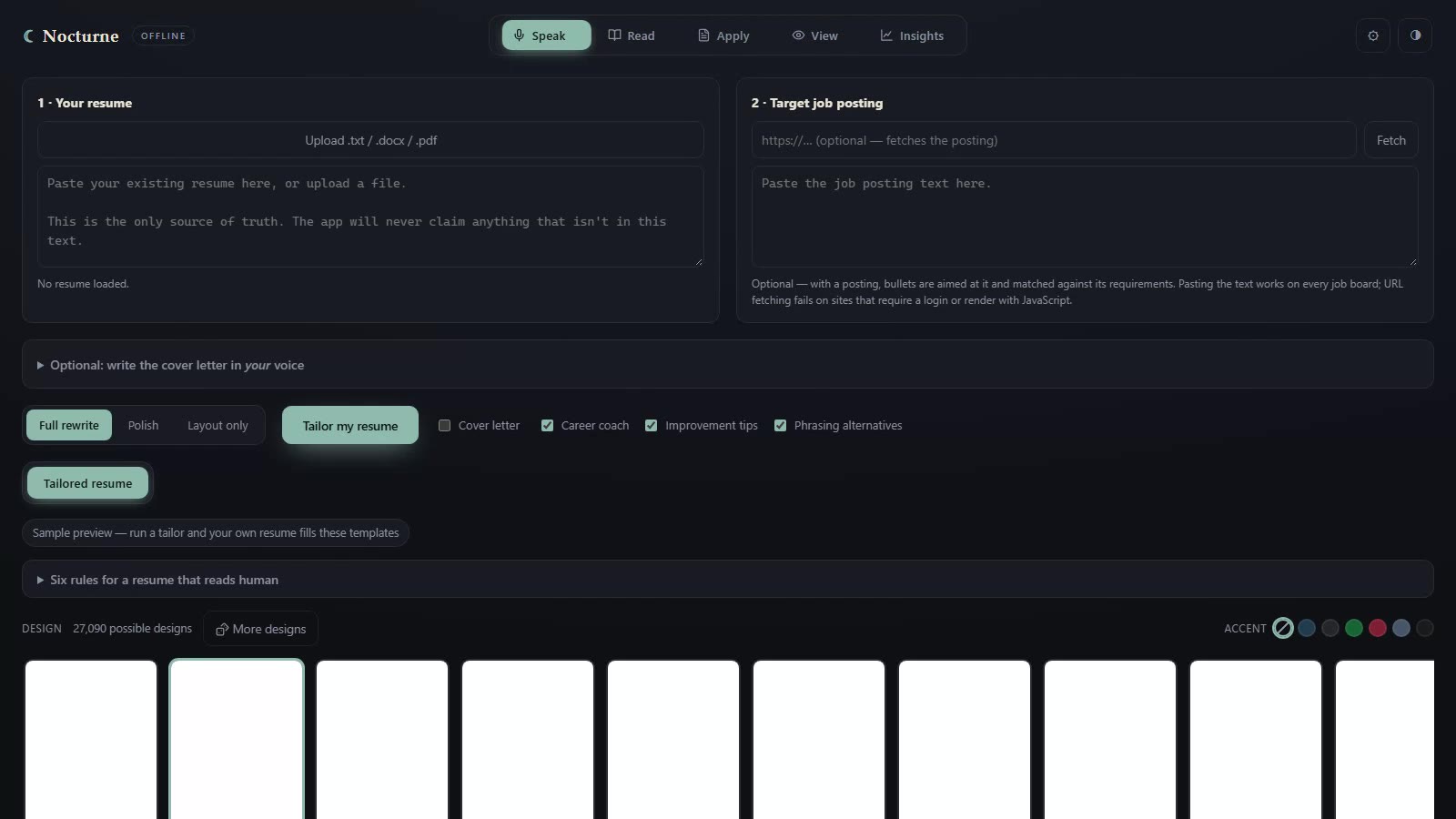
Nocturne Apply before a run: a box for your résumé, a box for the job posting, the Full rewrite, Polish and Layout-only modes, and a strip of résumé designs.
  • Rebuilds your résumé for the job in front of you
  • Writes a matching cover letter in your voice
  • Invents nothing — every number and title checked against your own résumé
  • Your résumé never leaves your machine — the one request it can make is fetching a job link you paste

$59 · one-time · coming soon

Explore Nocturne Apply →

View

with Nocturne

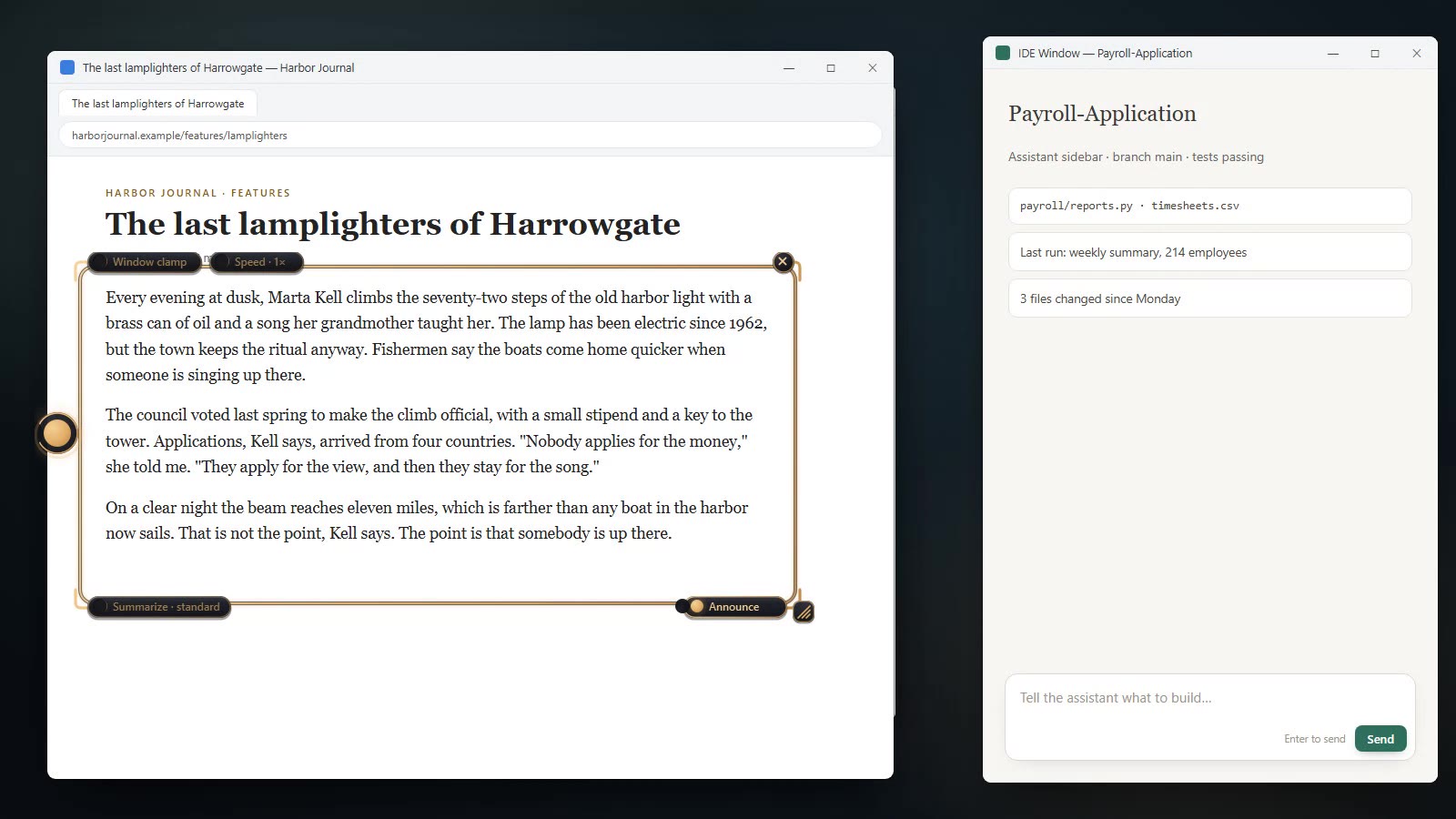
A floating frame that reads your screen out loud — or watches text stream past and speaks the gist once it settles. No file to open, no import step.

Nocturne Lens at work: its gold frame over an article in a browser window, with the Window clamp, Speed, Summarize and Announce pills and the moon on the ring, beside an editor window.
  • Reads text you cannot export — if the pixels show it, Lens speaks it
  • Summarize mode: watch a long agent run or build log, hear the gist, keep working
  • Talk to it — “summarize”, “follow this window”, “screenshot this into the chat” — and it answers in its own voice
  • What it reads stays on your machine — no transcript saved, nothing uploaded

$59 · one-time · coming soon

Explore Nocturne Lens →
0
servers of ours
0
accounts required
0
bytes of telemetry
4
apps, one quiet suite

The Pledge

Your work stays on your computer.

Your documents, your voice, your screen and your résumé are never uploaded, and there is not a single byte of telemetry. Nocturne's AI runs on your computer, so your work has nowhere else to go: no copy on a server to breach, no account to leak. The apps go online in exactly one case, and only when you ask: paste a job link into Apply and it fetches that public page. Nothing of yours goes with the request, and pasting the posting as text skips it entirely.

Data sent to our servers

A chart showing a perfectly flat line at zero bytes, forever. 100 B 75 B 50 B 25 B 0 B JAN MAR MAY JUL SEP NOV

0 bytes. Forever. There is no server for your work to reach.

We collect Where it goes
Your documents — Nowhere. They never leave your device.
Your voice — Processed in memory, on your machine.
Your résumé — Yours alone.
Your usage analytics — Entirely on your computer.

No account

Install and open. That's it.

No cloud

The models and voices run on your own processor. Your book, your voice, your screen and your résumé are never uploaded — there is no server of ours to upload them to.

No telemetry

No crash reports, no usage pings, no licence check. Nothing about how you use the apps is reported to us or to anyone else. The Insights tab does count your dictation, and can read your transcripts if you switch that on. We send it nowhere, and all processing is done on your own machine.

Works offline

Pull the cable and nothing changes.

A promise this large deserves an explanation. The machinery is just below.

The site asks before running any analytics. The apps report nothing to anyone, ever. Everything the Insights tab does stays on your computer.


On Your Machine

How a private AI actually works.

  1. Download once.

    Every app ships with the same compact language model — a few gigabytes on your disk, tuned to run fast on ordinary laptops.

  2. Everything happens locally.

    Reading, listening, writing: the model computes on your processor, in your memory. Your files are opened, never uploaded.

  3. Nothing to connect to.

    There is no Nocturne server behind the curtain. Offline isn't a degraded mode — it's the only mode.

YOUR COMPUTER your document Nocturne the result the internet and everything else
Runs on: modern Windows laptops (macOS planned) Footprint: a few GB per app GPU: not required Network: not required

Verify it yourself: switch on airplane mode. Reading, dictation and the lens carry on exactly as before — the only thing that stops working is fetching a job posting from a link you paste into Apply.


By Moonlight

Each app, up close.

You know your work stays on your machine. Here is what each app does with it.

A narrator for everything you never have time to read.

Load a report, a story, a contract, a poem. Nocturne Read gives it a voice — and in fiction, a cast: each character gets their own, so a novel sounds like a novel, not a spreadsheet.

Contractions, dropped g's and invented names — gonna, ain't, runnin', Whisperwood — read as speech rather than spelling, for as long as you care to listen.

Whatever you load stays loaded here. Nothing is uploaded, ever.

Nocturne Read with the cast panel open over the story: four characters found in the book, each with a trait tag, a voice picker and a preview button, plus Re-check cast and Reset to automatic. The sentence being read is highlighted in the text.

It knows who's speaking — and gives them each a voice.

Your fastest keyboard is your voice.

Nocturne Speak follows you across your whole machine — your email, your editor, your notes — and turns natural talk into clean text, right where your cursor is.

No push-to-talk theater, no cloud round-trip. Just speech becoming words, at the speed you think — and thousands of keystrokes your hands never have to make.

Your voice never leaves the room it was spoken in.

The Nocturne Speak tab: the orb with a timer, the F8 push-to-talk key, microphone and hands-free settings, and the options to paste the transcript at the cursor and press Enter to send it.

Dictate into anything — your email, your editor, your notes.

Every application tailored. Every draft private.

Give Nocturne Apply your résumé and the job listing. It rebuilds your experience around what the role actually asks for, and drafts a cover letter that still sounds like you.

A job search is exactly the data you least want sitting on someone else's server. Here, it never does.

We never read your résumé. We couldn't if we wanted to — it never leaves your machine.

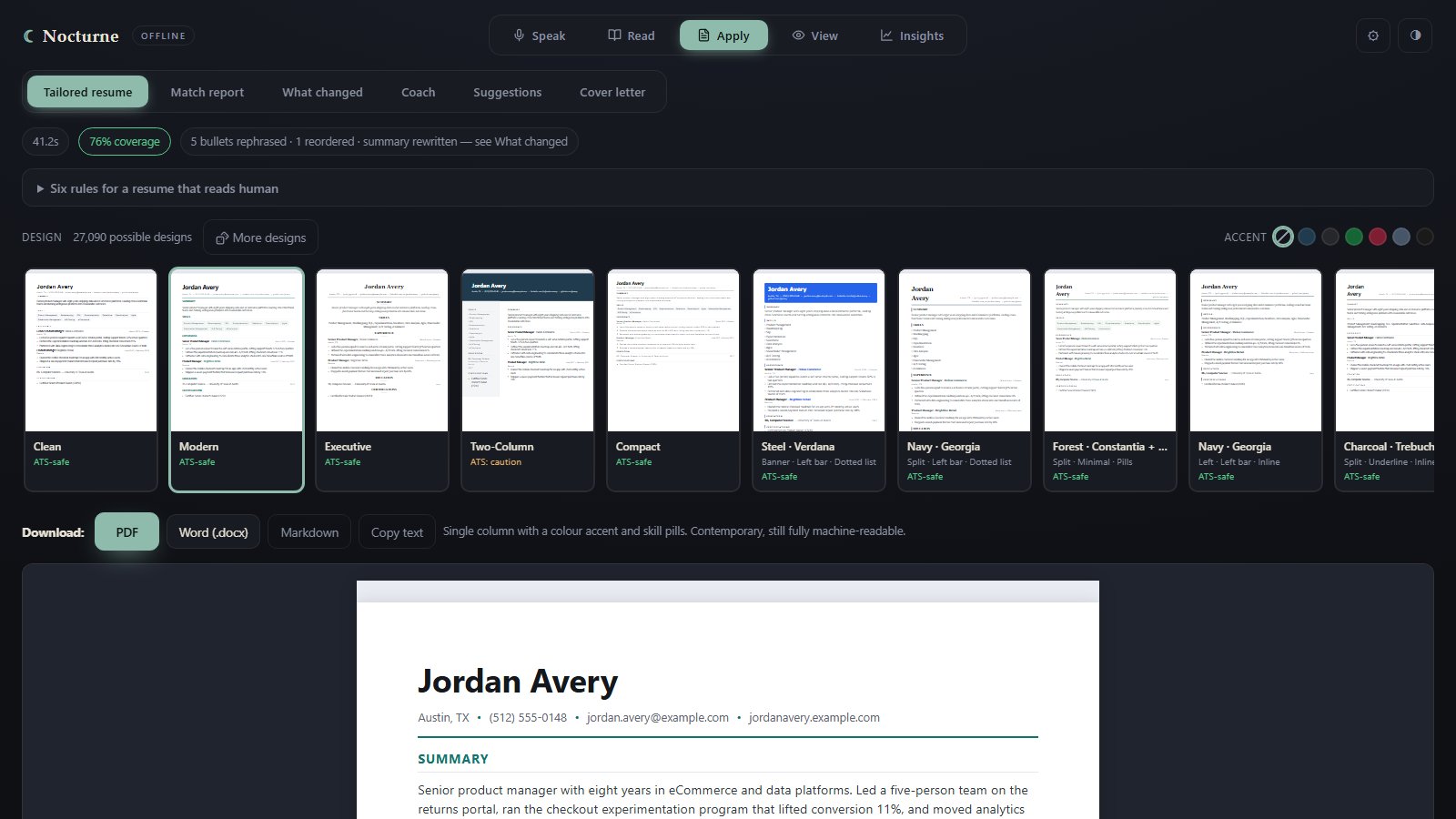
Nocturne Apply after a run: the Tailored resume tab with coverage and change chips, a strip of résumé designs each marked with its scanner rating, download buttons for PDF, Word, Markdown and copy, and the live preview of the demo résumé.

The same true story, retold for the job in front of you.


Rent vs. Own

Subscriptions climb. Ownership doesn't.

Apps in these three categories typically rent for $139 to $316 a year — every year. Nocturne is priced once. After that, the math simply stops.

Reading

A typical subscription

$139 / yr

due again every year

Nocturne Read

$59 once

yours forever

Pays for itself inside six months.

Dictation

A typical subscription

$144 / yr

due again every year

Nocturne Speak

$59 once

yours forever

Pays for itself inside five months.

Résumés

A typical subscription

$316 / yr

due again every year

Nocturne Apply

$59 once

yours forever

Pays for itself inside ten weeks.

One year of a typical subscription vs. owning the Nocturne app outright

Reading Dictation Résumé Nocturne, one-time
A bar chart with three categories. Reading aloud: a typical subscription is 139 dollars a year, Nocturne Read is 59 dollars once. Dictation: a typical subscription is 144 dollars a year, Nocturne Speak is 59 dollars once. Résumé tools: a typical subscription is about 316 dollars a year, Nocturne Apply is 59 dollars once. $0 $100 $200 $300 Reading Dictation Résumé tools Typical reading subscription: $139 per year Nocturne Read: $59, once Typical dictation subscription: $144 per year Nocturne Speak: $59, once Typical résumé-tool subscription: about $316 per year Nocturne Apply: $59, once $139 / yr $59 · once $144 / yr $59 · once $316 / yr $59 · once

One year rented costs 2–5× the price of owning it outright — and all three together are $129, less than a single year of any one subscription.

Three subscriptions Nocturne — all three
Year 1$599$129
Year 2$599$0
Year 3$599$0
Three-year total$1,797$129

All three tools rent for $599 a year.
The same three, from Nocturne: $129, once.

One price. No renewal date. Nothing to cancel.

Figures reflect published standard pricing of leading subscription apps in each category, August 2026. Naming names would be rude.


Your Constellation

One app, two, or the complete suite.

Nothing here is for sale yet — checkout and the trial downloads are still being finalized. When they open, every license will be one-time: yours to keep, on up to two of your machines, with a year of updates and thirty nights to change your mind. Every app will have a free trial build to run first. No card, no account, either way.

$59 for one · $99 for any two · $129 for any three · $149 for all four.

Choose your apps

Checkout is handled by our payment partner — the one moment the internet is involved, and your documents still are not.


Quiet Answers

Questions, answered plainly.

How can it be private if it uses AI?

Most AI you have used runs on a company’s servers, and everything you type or upload travels there to be processed. Nocturne’s AI runs on your computer. Your documents, your voice, your screen and your résumé are read on your machine and never sent anywhere, because there is no server of ours for them to go to. Unplug the network and nothing changes.

Do I need an internet connection?

Only to download the installer. After that, never: reading, dictation, the Lens and résumé tailoring all keep working with the network cable pulled or airplane mode on. The one thing that needs a connection is fetching a job posting from a link you paste into Apply, and pasting the posting as text instead removes even that.

Is it as good as the online AI services?

For these jobs, yes, because it is built for them rather than for everything. Narration with a cast of voices, tidying dictation, reading and summarizing a screen, and tailoring a résumé to a posting are each tuned and checked on their own terms. What you give up is the general-purpose chat you would ask an online service for. Nocturne does not try to be that.

Will it slow my computer down?

Not while it is idle: when nothing is being read, dictated or tailored, it uses nothing. While it works it uses your processor the way any demanding app does, and it is built for ordinary laptops rather than workstations, so a graphics card helps but is not required. It waits in the system tray so your push-to-talk key keeps working, and the menu quits it completely whenever you want it gone.

What are the system requirements?

A Windows laptop or desktop from the last several years, and a few gigabytes of disk per app for the voices and the AI it installs. No graphics card is required. macOS is planned but not available yet, so a Mac cannot run it today.

What happens after my year of updates?

Nothing changes: the apps you own keep working exactly as they are, for as long as you want to use them, on the same license. The year covers new versions and improvements. If you want the versions released after it ends you renew; if you do not, you simply stay on the last one you have.

Can I try it before I buy?

You will be able to. Each app gets its own free trial build, and none of them are downloadable yet — they arrive with checkout. When they do: Nocturne Read narrates the first ~10,000 words of any book, Nocturne Speak gives you ten minutes of dictation a day, Nocturne Lens reads 8,000 words a day, and Nocturne Apply runs on its lighter model and watermarks what you export. Trials ship with four of the forty-eight voices; the creature voices are in the full version. No card, no account.

How does buying work without an account?

You pay once through our payment partner and a license key arrives by email. There is no Nocturne account to create, and that email address is the only thing we hold about your purchase. The key unlocks the app on up to two of your machines and comes with a year of updates, and if it is not for you there are thirty nights to change your mind. Checkout is not open yet.

Is it one app or four?

One window. Each app you own appears as its own tab — Speak, Read, Apply and View — and Insights comes along with Speak. Own one and you get one tab; own all four and you get the whole row.

Can I change how it looks?

Five themes: Nocturne, the dark one; Daylight, a light one; and Rosé, Blush and Fuchsia. Your choice is remembered, and Apply follows it.

Can I use it for client or confidential work?

Yes. Whatever you read, dictate, frame or paste stays on the machine it is on: nothing is uploaded or sent anywhere, and there is no account or server of ours in the picture. The one outside request any app can make is fetching a job posting from a link you paste into Apply, and that request carries nothing of yours; paste the posting as text and there is no request at all. Need to show a client? Switch on airplane mode and keep working.

No cloud. No accounts. Nothing you make ever leaves your computer.

Choose your apps

One-time purchase, never a subscription · Works offline today

No apps selected
Review